File, Dispatch, Finish
June 13, 2026My approach to coding after graduating from university has not changed much up until early 2024, when I seriously started integrating AI in my daily workflows, but it seems that the most significant changes are still yet to come. At first, when experimenting with GitHub Copilot, I used it only for basic autocomplete of code in the closest scope. Then in 2025, I moved to Cursor which offered much better autocomplete capabilities. It worked throughout the whole file and multiple files as well. I could move faster and with very surgical precision. I tried to use the chat interface as well, but its capabilities were quite limited. It was useful mainly for debugging of known problematic parts of code, or for writing small-scope functions, and the experience was basically on-par with just using the free version of ChatGPT. All this time, the approaches of software engineers were more or less the same, because the tools were designed with a very specific use in mind.
It all changed when Claude Opus started showing promising results in late 2025. Suddenly, the previously awkward chat interface became the way we express our needs and requirements when building systems. Now, the AI is not just a chat interface, it is markdown documents describing how to behave, skills that can be readily loaded, memories of past conversations and many others. The software development work has become more about how to control the AI in order to get what you want, yet I still see people not taking advantage of it. It takes a lot of energy to stay up to date with new developments and approaches, but most importantly, there is now a nearly infinite number of ways to do the same thing.
When I thought about how to take advantage of this rapidly changing environment, I knew that my new approach had to be very simple. It shouldn’t require me to build complex pipelines, install new software, or integrate something because of some feature that is already supported by the required stack. The only requirements are GitHub (issues, PR, CI/CD), because I already have all the code there, and Claude (coding, orchestration, memory), because that is my current AI of choice, but any other AI would work the same way. The approach is defined as an abstract pipeline with three distinct consecutive steps: 1) File, 2) Dispatch and 3) Finish. The pipeline has to be executed in order, but there can be an unlimited number of pipelines running at the same time. The steps can be triggered by different actors from different places. This lets us parallelize the work of many agents while still being able to understand what is being done.
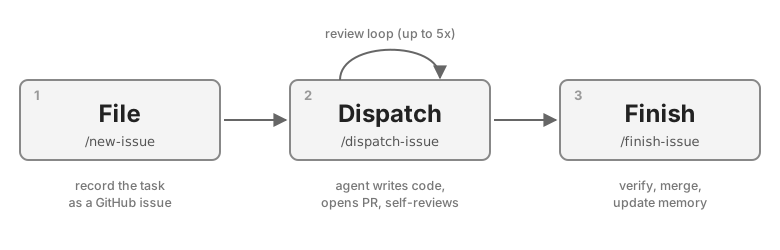
File
The first step in the pipeline is to record what we want to do or what we should do.
When there is a feature we want to develop, or when there is a bug we want to fix, we can file an issue through Claude Code.
Claude Code comes with a /new-issue skill which allows us to generate and post an issue to GitHub.
Claude Code has access to the context of the repository on which we run the skill, so it can provide many important details even before we start working on the issue.
The issue can be filed by any other system that has write rights to the GitHub repository.
We can file as many issues as we want, or just one and move on to the next stage, but the important thing is that it depends on the situation and we are not limited.
Dispatch
The dispatch step is when the AI actually starts working on the problem.
Similarly to the previous step, there are multiple ways we can trigger it: manually or automatically by a system that has access to GitHub to read the issue, write code, and open a PR.
When working on new features or bug fixes, I trigger this step manually from within a new claude agents session using a custom skill /dispatch-issue which requires me to specify the issue ID (e.g. /dispatch-issue 593).
Sometimes, I might want to add a little more context, but most of the time, I just specify the ID.
Each dispatched agent works in its own separate git worktree, so multiple issues can be worked on at the same time without interfering with each other.
The agent then starts working on the issue following the /dispatch-issue skill, whose goal is to solve the problem explained in the issue (paraphrased below):
- Attach WIP prefix to the issue that was dispatched
- Before coding anything, ask for confirmation if there are multiple ways of achieving the goal
- Split the work into the steps that are separated by commits
- Open PR and link it to the issue
- Repeat the following up to 5 times:
- Launch review agent on your PR
- Fix its findings directly in the PR if they are related
- File new issues based on unresolved findings
- Notify about completion
The review agent finds at least one issue in most of the PRs that the original agent created, unless the PR is very small. The limit of five review rounds was set just as a guess. It has never gone over four rounds of reviews.
Finish
Currently, the last step is always triggered by me, and never through automated processes.
It is mainly to make sure that the generated code solves the problem we wanted to tackle, to help the AI learn from this completed issue, and maybe surprisingly to help me stay up to date with everything that is going on because it can get challenging.
The step is triggered by the /finish-issue skill which requires me to specify the issue ID, which is tied to the PR (e.g. /finish-issue 593).
It is composed of three substeps, but before any of them I verify by hand that the change actually solves the problem described in the issue:
- Merge the PR if all checks passed
- Remove the WIP prefix from the related issue
- Update AI memory about the project based on this work
Conclusion
I have been using this system across multiple projects for more than two months, and the main payoff is exactly what I was after: I can confidently work on many things at the same time, even across multiple repositories, without having too hard a time with context switching. I am very happy with having the issue to PR trail because it contains all the information that can get me, the AI, or other collaborators up to speed. There is, however, one thing that is a little bit bothersome and that is the dependency on the issue ID. It does not matter much in the first and second step, but at the third step I am looking at a PR which has its own ID, and I have to make sure I find the right issue ID for the specific PR. The easiest solution for this would be to include the issue ID in the name of the PR. Another thing that made this approach a bit painful was GitHub itself. I have an open terminal window with Claude Code and another window with the GitHub website. The GitHub website is very slow, so I have been building my own faster way to keep everything in one place. I will be sharing more information about it soon.
The way we build software is still being figured out, and this pipeline is just the shape that works for me right now. What I am fairly sure about is the direction: less manual coding, less micromanagement of the agent, and more time spent deciding what should be built rather than typing it out. File, dispatch, finish is simple enough that I can keep using it while everything around it keeps changing, and simple enough that you can take it and bend it to your own stack.